API keys and MCP
This page shows how to create an API key, revoke it, and use it with OhPlayer's MCP server or over HTTP.
An API key lets a tool act on your account without your password. Keys work on Lite and Pro. Right now every key has full access to your account: it can read your videos and analytics, propose recuts, publish, replace and import. Treat a key like a password.
Create a key
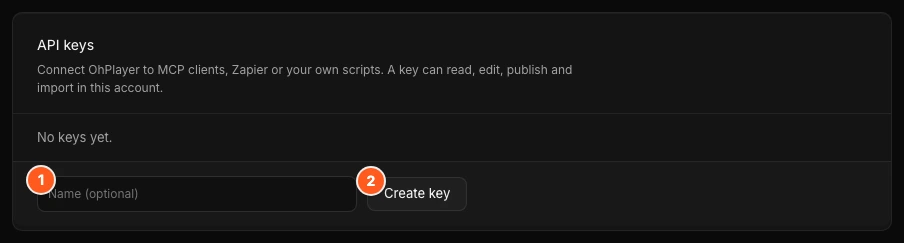
Click your name in the sidebar to open your account settings, then open the Developers tab. Under API keys, type an optional name (up to 40 characters, for example "Cursor laptop") and click Create key.
Copy the secret
The new key appears with its secret hidden. Click the eye icon (Show key) to see it, or click Copy. OhPlayer shows the secret once: "Copy it now. It won't be shown again." Paste it into a password manager or your tool's settings right away.
Use it
The secret starts with ohp_live_. Send it as a Bearer token:
Authorization: Bearer ohp_live_...
Later, the list shows the name, the start of the key (for example ohp_live_AbC1234…), when it was created and when it was last used.
Revoke a key
Click Revoke next to the key, then confirm Revoke. A revoked key stops working immediately. If a key leaks, revoke it and create a new one.
MCP
MCP is a standard way for AI tools to call other apps. OhPlayer's server takes JSON-RPC 2.0 requests:
POST https://api.ohplayer.com/mcp
Authorization: Bearer ohp_live_...
tools/list returns 13 tools, each with an input schema. To set up Cursor, Claude Code or another client, see Connect an AI assistant.
| Tool | What it does |
|---|---|
list_videos |
Lists the videos in your library. |
get_video |
Returns one video with its versions and captions. |
get_watch_curve |
Returns the retention curve for the last 30 days. |
get_transcript |
Returns timed transcript cues. Answers 409 if the video has no captions yet. |
get_funnel |
Returns the Play → 50% → CTA → Lead funnel for the last 30 days. |
get_leads |
Returns form submissions. On Lite it answers "Leads are on Pro. Upgrade to see them." |
propose_recut |
Proposes cuts from the transcript. It does not publish. |
apply_recut |
Encodes an accepted recut as a new version. Uses AI credits. |
publish_version |
Makes a ready version the live embed. |
replace_video_from_source |
Replaces a video's media with another video from your account. |
get_embed |
Returns the embed snippet. |
import_from_url |
Imports a video from a URL or a cloud source. |
get_job |
Checks an import, recut or transcription job. |
Publishing
Ask your assistant to show you a recut and wait for your approval before it publishes. replace_video_from_source goes live as soon as encoding finishes.
MCP cannot upload file bytes, and no MCP tool runs the AI edit (the Clean and Bold edit you start in the Studio). To add a new file, use the Studio or the HTTP upload below.
MCP answers with HTTP 200 even for errors. The error is in the JSON-RPC error field.
Replace a video over HTTP
A replacement keeps the same video_id and creates a new version. Do not send a version_id. The server assigns it.
Upload a new file as a replacement:
POST https://api.ohplayer.com/api/uploads
Content-Type: application/json
Authorization: Bearer ohp_live_...

{
  "size": 184231936,
  "file_name": "homepage-v4.mp4",
  "video_id": "7e2c0c8a-9b65-4b5e-9d28-2e2ff6a1c9ac"
}
Then PUT each chunk to /api/uploads/{session_id}/{chunk_index} and POST /api/uploads/{session_id}/complete.
To reuse another video from your account without uploading:
POST https://api.ohplayer.com/api/videos/{video_id}/replace-from
Content-Type: application/json
Authorization: Bearer ohp_live_...

{
  "source_video_id": "c8c4b1b2-b1b1-4d4e-8e5a-a7d2e9f4c0b1"
}
The reply is 202 with a video_id and a version_id. The new version goes live when it finishes encoding. To keep the old one live, add "publish_on_ready": false and publish later. Poll GET /api/videos/{video_id}/status until that version is ready and matches active_version_id. See Replace a video.
Request limits
Limits apply to each account per minute. If you go over, the request is refused and the reply says when to try again.
| Requests | Limit |
|---|---|
Reads (GET) |
300 |
Most writes, including POST /mcp |
60 |
| Starting an upload | 10 |
| Upload chunks | 300 |
| Imports and transcriptions | 5 |
| Recuts and publishing a version | 5 |
Accounts in their first 7 days have lower limits on writes (30), starting uploads (3), chunks (150), imports (2) and recuts (3).
Next steps
Was this page helpful?
Your answer stays in your browser. Nothing is sent to us or to anyone else.