- Pro
Webhooks
This page is the reference for sending OhPlayer events to Make, n8n or your own server, and for checking that each request really came from OhPlayer.
A webhook is an HTTPS address that receives a POST with JSON each time something happens: a viewer starts your video, clicks a CTA, finishes it or submits a lead form.
Prepare your endpoint
Create the receiver first.
- Make: add a Webhooks → Custom webhook module and copy its URL. Click Run once to listen for a sample.
- n8n: add a Webhook node that accepts
POST, publish the workflow and copy the Production URL. - Your own server: accept a JSON
POSTon anhttps://address and return a2xxstatus.
The URL must use https:// on port 443, have no user name, password or # fragment, and resolve to a public address. Local and private addresses are refused.
Add the connection
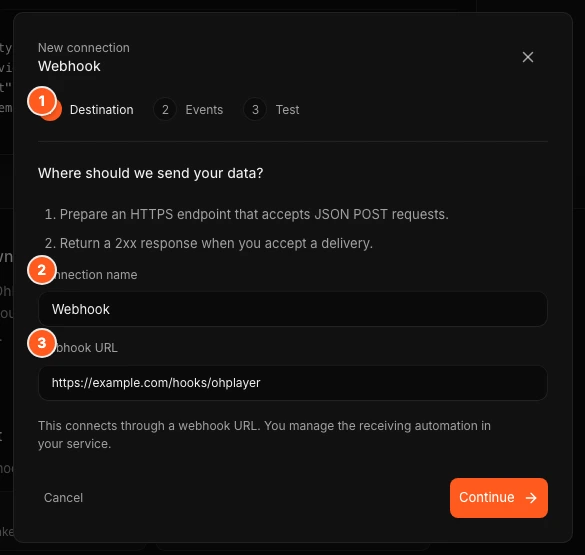
Click Integrations in the sidebar, then Webhooks. Click a destination tile (Make, n8n or Webhook), or click + Add connection if you already have one. In the window:
- Enter a Connection name and paste the Webhook URL. Click Continue.
- Choose the events to send. Lead captured is recommended and pre-selected. Click Continue.
- Click Save & send sample.
Check the sample
OhPlayer sends a sample with "test": true and waits for your answer. "Sample accepted · HTTP 200" means your endpoint replied with a 2xx. Check that your automation received it, tick I checked that the sample reached my automation. and click Finish setup. If it fails, the window shows the reason. Fix the endpoint and click Save & send sample again.
Copy the signing secret
Open the connection and click Copy signing secret, next to Edit. A message says "Signing secret copied." Store it in your server's settings and never in page code. Copying does not change the secret. The button is not shown on Lite, where webhooks are locked.
Events
| Event | Name in the request | Sent when |
|---|---|---|
| Video started | play |
A viewer starts the video. |
| Video completed | ended |
A viewer reaches the end. |
| CTA clicked | cta_click |
A viewer clicks a timed CTA. |
| Lead captured | lead |
A viewer submits a lead form. This is the only event with contact details. |
Only new events are sent. Leads you already have are not sent again when you add a connection.
What a request looks like
OhPlayer sends Content-Type: application/json. A lead looks like this:
{
  "id": "0c9d6f3e-5c1c-4a8e-9a55-6f0c2b4d7e11",
  "event": "lead",
  "occurred_at": "2026-09-29T10:15:30.000Z",
  "data": {
    "video_id": "7e2c0c8a-9b65-4b5e-9d28-2e2ff6a1c9ac",
    "version_id": "b7d0c1f0-5e5d-4d0e-b0f4-1a2b3c4d5e6f",
    "session_id": "5f1f5c7e-0d0e-4a0b-8f3a-9c8b7a6d5e4f",
    "position": 42.5,
    "lead": {
      "email": "[email protected]",
      "name": "Sample contact",
      "consent": "I agree to share my details with the owner of this video to access the video."
    }
  }
}
position is the second of the video where the event happened. The lead object holds the fields your form asks for, plus the consent text. Other events have no lead object. Sample requests add "test": true and use placeholder values.
Headers
| Header | Value |
|---|---|
X-OhPlayer-Id |
A unique id for this delivery. It stays the same on every retry. |
X-OhPlayer-Timestamp |
The send time in Unix seconds. |
X-OhPlayer-Signature |
sha256= followed by the signature described below. |
User-Agent |
OhPlayer-Webhooks/1.0 |
Use X-OhPlayer-Id to ignore a delivery you have already processed, so retries do not create duplicates.
Verify the signature
The signature is an HMAC-SHA256, in hex, of the timestamp, a dot and the raw request body, using your signing secret as the key. Use the raw body exactly as received, not a re-encoded copy.
import crypto from "node:crypto";

export function isFromOhPlayer(rawBody, headers, secret) {
  const timestamp = headers["x-ohplayer-timestamp"];
  const signature = headers["x-ohplayer-signature"];
  if (!timestamp || !signature) return false;

  // Reject old requests (5 minutes here).
  if (Math.abs(Date.now() / 1000 - Number(timestamp)) > 300) return false;

  const expected =
    "sha256=" +
    crypto.createHmac("sha256", secret).update(`${timestamp}.${rawBody}`).digest("hex");

  const a = Buffer.from(signature);
  const b = Buffer.from(expected);
  return a.length === b.length && crypto.timingSafeEqual(a, b);
}
Replies, timeouts and retries
- Reply with any
2xxstatus within 5 seconds. OhPlayer ignores the reply body. - Any other status, or no reply in 5 seconds, counts as a failure.
- OhPlayer tries up to five times in total, waiting 30 seconds, 1 minute, 2 minutes and 4 minutes between tries.
- After the fifth failure the connection shows Needs retry. Click Retry now to send that delivery again.
- OhPlayer keeps delivery records for 30 days.
Manage a connection
| Status | Meaning |
|---|---|
| Working | The last delivery arrived. |
| Sending | A delivery is waiting or being retried. |
| Needs retry | The last delivery failed. |
| Paused | Nothing is sent until you click Resume. |
| Not tested | No delivery has been made yet. |
Each connection has Send sample lead (or Send sample event), Edit, Copy signing secret, Pause or Resume, and Disconnect. Editing or pausing cancels deliveries that are still waiting. Disconnecting is permanent and asks you to confirm. Each connection has its own secret. To get a new secret, disconnect it and add the connection again.
Limits and plans
- Webhooks and Zapier are Pro features. You can have up to 25 connections. At the limit, the add button is disabled and reads "You have 25 connections".
- On Lite, connections are paused and show Paused. You can only disconnect them. Upgrade and they resume as they were.
Next steps
Was this page helpful?
Your answer stays in your browser. Nothing is sent to us or to anyone else.