Plans and limits
This page compares Lite and Pro, and explains storage, AI credits and what happens when you reach a limit or your plan ends.
Compare the plans
Plans differ by conversion tools and AI, never by bandwidth. Playback is included on both plans with no bandwidth charges and no traffic limit.
| Lite | Pro | |
|---|---|---|
| Monthly price | $24 | $79 |
| Annual price (2 months free) | $240 | $790 |
| Source-video storage | 100 GB | 500 GB |
| AI credits per month | 30 (3 hours) | 200 (20 hours) |
| Timed CTAs, lead forms and playgates | No | Yes |
| Leads list | No | Yes |
| Sales tracking from your checkout | No | Yes |
| Webhooks and Zapier | No | Up to 25 connections |
Both plans include:
- A watermark-free, branded player
- Adaptive streaming (1080p, 720p and 360p, depending on your source)
- Embeds, sharing, the Library and folders
- Captions, transcripts, thumbnails and HTML reveals
- AI edit
- Engagement analytics and video comparison
- Import from Vimeo and Wistia
- Ad pixel events for GA4, Meta and Google Tag Manager
- AI clients over MCP and API keys
Pro includes everything in Lite.
Annual billing
Annual billing charges 10 months for 12, so you get 2 months free. Lite is $240 a year and Pro is $790 a year. You can pick annual when you start a plan, or switch from Account → Plan & Billing. Switching to annual bills the difference now and starts a new yearly period.
Storage
Storage counts the source videos you upload, including space reserved for uploads that are still in progress. Encoded versions do not count. Gigabytes are decimal (1 GB is 1,000,000,000 bytes).
Storage limits are hard limits. There is no overage billing. If an upload would take you over your limit, it stops with "Storage limit reached. Upgrade your plan or remove a video." During the trial the message reads "Storage limit reached for your trial. Start your plan or remove a video."
To free space, delete videos you no longer need. Space comes back right away. See Delete a video or account.
Any single upload can be up to 2 GB, on every plan.
You can see your storage in the ring at the bottom of the sidebar and on Account → Plan & Billing.
AI credits
AI credits pay for captions (listening) and AI edits. 10 credits cover one hour of video, and each plan has a monthly allowance. Credits are counted over the last 30 days. If you run out you can buy a top-up: 100 credits (10 hours) for $15. Top-up credits do not expire.
The full rules are in Credits explained.
Free preview and trial caps
The free preview and the 14-day trial have lower caps than a plan. Trial storage is 25 GB, AI is 20 credits (2 hours), and viewing is 200 GB over the whole trial. See Sign in, free preview and trial.
Playback and fair use
No bandwidth charges apply on either plan, and there is no traffic threshold. A successful campaign is welcome, and traffic volume alone never triggers a review, a restriction or a charge.
We act only on abuse: reselling delivery, using OhPlayer as a general file CDN, traffic farms, or deliberately generating artificial traffic. We may restrict or suspend service, or terminate accounts for serious or repeated abuse. Where practical, we contact you first and allow an opportunity to resolve the issue. See the Fair Use Policy.
When your plan ends
A plan ends when you cancel and your paid period runs out, or when a payment fails. A trial ends the same way if you cancel it or the first payment fails.
A banner shows at the top of every page until you choose a plan. It cannot be closed.
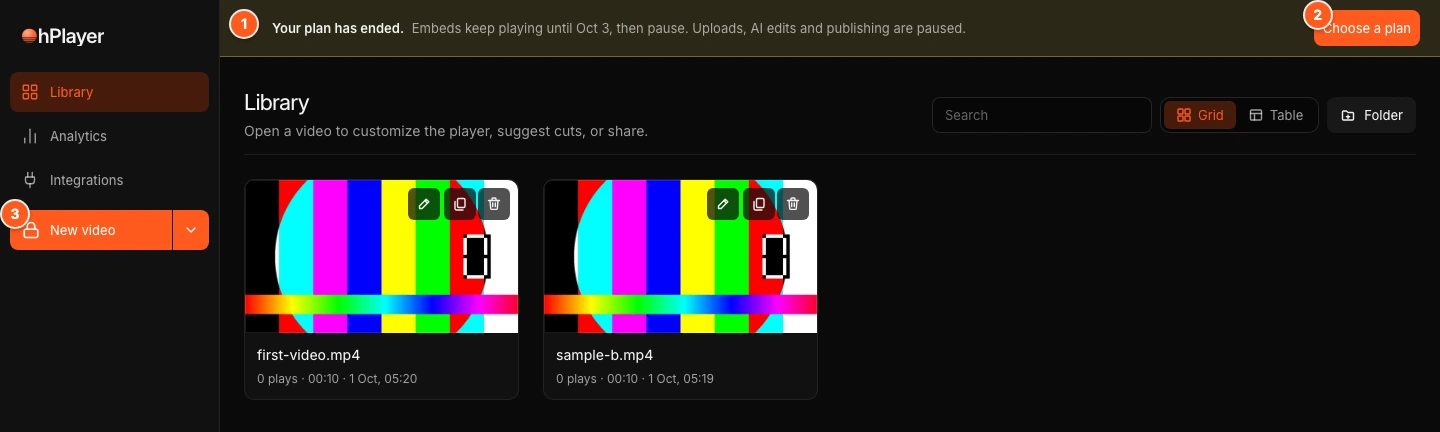
For the first 3 days:
- The banner says "Your plan has ended. Embeds keep playing until [date], then pause. Uploads, AI edits and publishing are paused."
- Published videos keep playing.
- Uploading, importing, AI edits and publishing pause right away. New video shows a lock and opens Account → Plan & Billing. An upload started another way stops with "Start a trial or renew your subscription before uploading."
After 3 days:
- The banner says "Your embeds are paused. Choose a plan to turn them back on. Nothing was deleted."
- The player shows "This video is paused. The owner needs to renew their OhPlayer plan." Players start again within a few minutes after you choose a plan.
If a payment failed, the banner starts with "Your last payment didn’t go through." and the button reads Update card instead of Choose a plan.
Nothing is deleted. Your videos, analytics and leads stay in your account. We email you when the plan ends and again when the 3 days are over.
Public players also pause if a video is disabled for abuse or a legal request.
Move from Pro to Lite
When you switch to Lite, Pro features pause. Nothing is deleted, and switching back to Pro brings everything back.
- CTAs and playgates: they stay saved, but viewers see the plain video. You cannot add or change them on Lite.
- Leads: your leads are kept. You can still export or delete them. To see the list again, upgrade.
- Sales tracking: sales keep being recorded, but revenue and which video made each sale stay hidden until you upgrade.
- Webhooks and Zapier: your connections are kept but paused. Nothing is sent until you upgrade.
Storage drops from 500 GB to 100 GB. Your existing videos stay, but you cannot upload more until you are back under the limit.
Which plan to choose
Choose Lite to host, caption and edit videos. Move to Pro when you need CTAs, lead capture, playgates, sales tracking or integrations, more than 100 GB of footage, or a lot of AI editing. If you only sometimes run out of AI credits, a top-up costs less than upgrading.
Next steps
Was this page helpful?
Your answer stays in your browser. Nothing is sent to us or to anyone else.